
The Captioning Glasses are powered by a removable battery. A fresh battery provides about 3 hours of non-stop captioning. Once the battery is depleted, it only takes seconds to swap in a fresh battery and continue using the glasses.
To swap the battery
Locate the battery at the end of the left arm of the glasses, as shown in the diagram. The battery is held in place magnetically. Gently pull the battery out from the arm to remove it.

Find the spare battery in the battery case
You’ll find a battery case in the XanderGlasses II kit. The battery case serves two purposes:
- It conveniently stores the spare battery.
- It charges the spare battery to keep it ready to use when you need it.
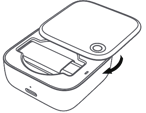
The top lid of the battery case opens and closes using a swiveling mechanism, rotating around the red circle as an anchor point. To open the battery case, rotate the lid clockwise. You’ll find the spare battery seated inside:
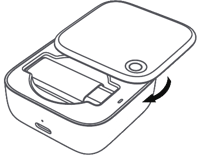
Remove the spare battery from the case. Place the depleted battery into the case, with the logo and text facing up, as shown in this photo:
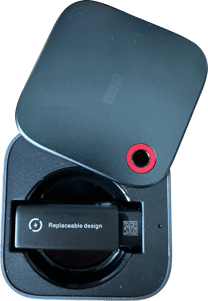
Swivel the lid counter-clockwise to close the battery case.
Place the spare battery in the left arm of the glasses, with the logo and text facing inwards. Please note: the battery will gently snap into place magnetically. If the battery is not easily sliding into the arm of the glasses, it may be facing the wrong way. Make sure the text and logo printed on the battery is facing inwards.